SDBT Framework
A Student's Journey into AI Architecture
What started as curiosity grew into an exploration of modular AI systems. I experimented, failed, and researched until the pieces began to connect. Along the way, I uncovered patterns that developers had mastered years ago, but learning them firsthand made the experience far more meaningful.
Student Project: June - August 2025 coursework (3 assessment phases)
What I Explored: Runtime behavior switching, mathematical modulation curves, modular design patterns
Learning Context: First deep dive into AI architecture, Clean Code principles, and Unity performance profiling
Project Status
Assessment Summary
All four phases were completed from March-August 2025 coursework.
Project serves as an archived exploration of AI architecture patterns with documented
performance limitations and learning outcomes.
Phase 0: Early Exploration
March-April 2025: Initial brainstorming and early AI framework development. Started exploring behavior tree concepts independently before formal coursework began.
Phase 1: Project Proposal
May-June 2025 (Assessment 1): Defined problem space and goals, scoped in/out features, outlined initial architecture (BT + stimuli curves), identified risks/assumptions, proposed success criteria and a delivery timeline.
Phase 2: Architectural Design
July 2025 (Assessment 2): Focused on architecture lock-down, refined behavior tree structure, stimuli selector strategies (hysteresis/debounce), JSON profile/schema approach, and blackboard typing/ownership rules; outlined performance and testing plans for later phases.
Phase 3: Analysis & Archive
August 2025: Focused on profiling the framework’s runtime performance and comparing my design decisions against established industry AI patterns. Documented trade-offs between modularity and efficiency, highlighted garbage collection bottlenecks, and outlined migration paths (e.g., DOTS/ECS).
Current State
Though archived, the framework remains a reference point in my portfolio. The lessons and documented migration paths continue to guide how I approach AI architecture in new projects.
Project Journey
Sometimes the best projects start with genuine inspiration. I was captivated by games like Dota2 Nest of Thorns, and Magic Survival, each brilliant in their own right. Nest of Thorns creates engaging tactical decisions within its focused minigame format, while Magic Survival excels at building satisfying spell combinations and progression systems in 2D space. These games prove that compelling gameplay doesn't require cutting-edge graphics or massive budgets.
But as I played them extensively (because I genuinely love these games), I realized their inherent limitations were not flaws; they were deliberate design choices. The predictable enemy patterns and linear difficulty scaling worked perfectly for the experiences those games set out to create. Still, I found myself wondering what might happen if I built on those foundations while experimenting with dynamic, adaptive AI. Not to replace what made them great, but to explore how more sophisticated behavior systems could open up new possibilities.
The Vision
What if enemy behavior could actually adapt and evolve during gameplay? What if the AI could learn from player strategies and counter them organically? I envisioned swarms of enemies that didn't just follow scripted paths but genuinely responded to how players approached each encounter. The technical challenge was fascinating: how do you create AI that feels alive without becoming chaotic?
Perfect Timing
When my coursework required an ICT project (a slight detour, but one I could frame as relevant), I saw an opportunity. Instead of building another generic behavior tree demonstration, I decided to explore the design problem that intrigued me most as a player. The academic framework provided structure and deadlines, while personal motivation gave the work real meaning.
The GDC Discovery
Midway through development, I discovered the “Nuts and Bolts: Modular AI From the Ground Up” talk from GDC. Watching industry veterans discuss the exact problems I was wrestling with was both humbling and validating. I realized I wasn’t reinventing the wheel; I was beginning to understand why the wheel works the way it does, and how much thought and experience go into even the most “obvious” solutions.
Multiple Wins
This project turned out to be more rewarding than I expected. The technical exploration not only satisfied my coursework requirements but also connected directly to the kind of game I wanted to create. The modular architecture patterns I worked with became useful portfolio pieces, showing more than just surface-level implementation. Just as importantly, the deep dive into AI behavior systems gave me a starting point for eventually building the kind of dynamic, adaptive enemies that first sparked my imagination.
The game itself remains unfinished, but the process taught me lessons and built a framework I continue to use long after the course ended.
Architecture & Key Decisions
To explore how adaptive AI might work, I aimed to design the system around clear layers: perception, decision-making, and action. Rather than building a monolithic behavior tree, I experimented with a modular approach where stimuli flow into a blackboard, decisions emerge through context-driven switching, and actions execute independently.
This separation of concerns was not just an academic exercise; it gave me the chance to try swapping logic at runtime, testing scenarios in isolation, and keeping the system more maintainable. I drew from design patterns like factories, registries, and observers, not to follow trends, but to see whether they could make debugging clearer and scaling more feasible. Looking back, the most valuable part was not adding layers of complexity, but discovering how to manage complexity more deliberately.
Layered Approach
To explore adaptive AI, I structured the system into clear layers: perception, decision-making, and action. This separation was meant to keep complexity manageable and allow components to evolve independently.
Layered Architecture Overview
Modular Behavior Trees
Rather than relying on a fixed tree, I experimented with a modular design where stimuli feed into a blackboard, decisions are context-driven, and actions can be swapped or extended at runtime.
Modular Behavior Tree Design
Design Patterns in Practice
I explored several design patterns not to follow trends, but to see whether they made the system more transparent, maintainable, and scalable. Some worked better than expected, others exposed trade-offs, but each gave me a clearer picture of how to structure adaptive AI.
Factory Pattern — Node Creation
Used to generate behavior tree nodes dynamically from configuration files. This reduced boilerplate and made it possible to hot-swap subtrees at runtime.
The factory pattern creates a clean separation between configuration and instantiation. JSON config files define node types and parameters, which flow through the NodeFactory to query the Registry for the appropriate builders. This approach eliminated hardcoded node creation scattered throughout the codebase, centralizing the logic and making it trivial to add new behavior types without touching existing code.
Strategy Pattern — Behavior Selection
Applied at the behavior tree selector level to decouple child-selection logic from execution. Different strategies determine which child node runs based on context, probabilities, or state thresholds, all swappable at runtime through configuration.
Each strategy implements IChildSelectorStrategy with distinct selection logic:
- ClassicSelectorStrategy — Priority-based selection (traditional behavior trees)
- StimulusSelectorNodeStrategy — Curve-evaluated probabilities with stability frames
- HysteresisFearSelectorStrategy — Enter/exit thresholds to prevent oscillation
Strategies read from the Blackboard, evaluate IStimulusCurve profiles when needed, and are constructed via factories from JSON configuration. This enables runtime behavior switching without touching core tree execution.
Observer — State Changes
In arena encounters, threats like explosions, hazards, or enemies can appear and disappear dynamically. Rather than hard-coding references that break when objects are destroyed, I used the observer pattern to keep the system simple and reliable.
FearEmitter announces itself → FearEmitterManager registers/unregisters and answers queries → FearPerception reads the data and writes normalized fear into the blackboard.
Each FearEmitter announces itself when spawned and unregisters on destruction. The central FearEmitterManager listens for these events and maintains a clean registry of active threats.
FearPerception modules query the manager each update, normalize the data (proximity, intensity), and write clear "fear levels" to the blackboard. This removes messy dependencies, as agents only observe the manager, not individual emitters.
Adapter & Plugins — Integration Layer
Behavior is data, construction is pluggable. The builder reads JSON, resolves references, and hands each node off to an adapter (factory) that translates config into concrete runtime nodes. Registries keep those adapters discoverable by alias, so adding a new node type or system capability doesn't touch the builder or execution core.
JSON configuration → BtTreeBuilder adapts using factories → Plugin registries resolve implementations → Runtime nodes created
The adapter system works in layers:
- Configuration Layer: JSON defines tree structure and node parameters
- Adaptation Layer:
BtTreeBuilder resolves node aliases through BtNodeRegistry to find the right factory
- Factory Layer:
IBtNodeFactory implementations translate config data into concrete runtime nodes
- Plugin Layer: Specialized factories like
BtStimuliSelectorNodeFactory handle complex nodes by pulling additional resources from BtConfigRegistry
Orthogonal systems maintain their own plugin points—TargetResolverRegistry for targeting, schema registries for validation—without creating dependencies on the core behavior tree. This separation means you can extend targeting logic or add new node types independently.
Managing Complexity
As I built the framework, I found that the challenge was not adding more features but preventing the system from becoming too tangled. While researching, I came across the CogBots architecture, which organizes agents into perception, deliberation, and action layers connected by a shared memory (Aversa et al., 2016). I did not implement CogBots directly, but it gave me a useful reference point that resembled the layering I was already experimenting with: stimuli flowed into a blackboard, behavior trees handled decisions, and actions executed separately.
Learning from Industry Examples
I also spent time learning from industry examples. Damian Isla's "Managing Complexity in the Halo 2 AI System" showed how scalability in AI can mean keeping hundreds of small rules predictable rather than making them larger or more advanced. Andre Arsenault's "Siege Battle AI in Total War: Warhammer" demonstrated how tactical subsystems and clear layering made large-scale battles manageable.
Both talks shaped how I thought about complexity: it is never eliminated, but managed through careful structure and consistent patterns.
My own framework followed that same spirit. Layering, modularity, and debug overlays did not erase complexity, but they gave me ways to keep it visible and under control. The process helped me appreciate how academic and industry insights can inform even small student projects when applied thoughtfully.
Visualizing the System
To capture the architecture, I created layered diagrams using C4 model principles to show both high-level context and detailed component interactions.
C2: System Context & Containers
Shows how the AI behavior engine connects to game systems, simulation, and external services

Junior Dev Exploration Notes
What started as a rough sketch grew into an exploration of how my AI behavior engine connects to the rest of the game. I was curious about where modular behavior trees would sit alongside Unity’s physics, rendering, input, and state systems, so I drafted a C2-style diagram to see the bigger picture.
This work was created as part of Assessment 2/3 in my coursework. At the time, I had been reading about C4 model principles, and their influence shows in how I tried to draw clear boundaries between different “containers” of functionality. Even though the diagram was simple, it helped me uncover an important insight: the AI system could never be truly isolated. It needed well-defined interfaces to perception data (physics), decision execution (game objects), and tools for debugging and monitoring.
Caveat: This is very much exploratory work from a student perspective. The boundaries and relationships I drew here reflect my understanding at the time, which may not align with how experienced game architects would structure these systems. I was learning to think in terms of system boundaries and data flow, but the specific choices around what goes where should be taken as learning exercises rather than architectural recommendations.
C3: AI Behavior Engine Breakdown
Zooms in on internal modules such as perception, blackboard, stimuli processor, decision core, and action adapters, highlighting runtime switching mechanics.

Junior Dev Deep Dive
This C3 breakdown was where I really tried to understand the "guts" of my AI system. I was fascinated by the idea of clean separation between perception (gathering stimuli), deliberation (behavior trees making decisions), and action (executing those decisions in the game world). The diagram shows my attempt to map out how data flows through these layers.
What you are seeing here is my exploration of the "runtime switching mechanics" I kept talking about. I wanted to understand how the system could hot swap different behavior tree configurations, curve evaluators, and selection strategies without breaking the overall flow. I was particularly excited about the blackboard pattern as a way to decouple these components while still allowing them to share state.
The callouts and annotations reflect the questions I was wrestling with: How do you keep modules loosely coupled but still performant? Where do you draw the boundaries between configuration and code? How do you make the system observable for debugging without creating dependencies?
Caveat: This represents my student level understanding of modular AI architecture. The specific component boundaries, naming conventions, and interaction patterns shown here are the result of experimentation and learning rather than battle tested industry patterns. Some of the abstractions I drew might be over engineered for practical use, but they helped me understand the underlying concepts.
Validation & Scenarios
Architecture only matters if it works in practice. To test the framework, I built small sandbox scenarios where agents reacted to stimuli in real time. These experiments let me watch behaviors switch dynamically, configurations reload, and decisions unfold through debug overlays. They were not polished games, but controlled environments that made the system's strengths and limits visible.
Context
This work was part of Assessment 3 in my coursework, where validation was deliberately scenario-driven and criteria-based. One of those scenarios was titled "Cubes Fight Back," which sounds dramatic, although in reality the cubes do not really fight. The point was never about flashy gameplay, but about proving that the AI could adapt, switch roles, and respond predictably to stimuli under test conditions.
Caveat: These scenarios reflect my student-level approach to validation. They should be seen as learning exercises in modular AI testing rather than fully fledged game prototypes. Still, they gave me valuable insight into how architecture and runtime behavior intersect in practice.
Cubes Fight Back
A simple test where enemies switched between moving, pausing, and fleeing based on thresholds. It wasn't about creating fun gameplay, but about proving that runtime stimuli could drive adaptive decisions.
Agent Behavior Demonstrations
Live demonstrations showing how agents respond to environmental stimuli through dynamic behavior switching
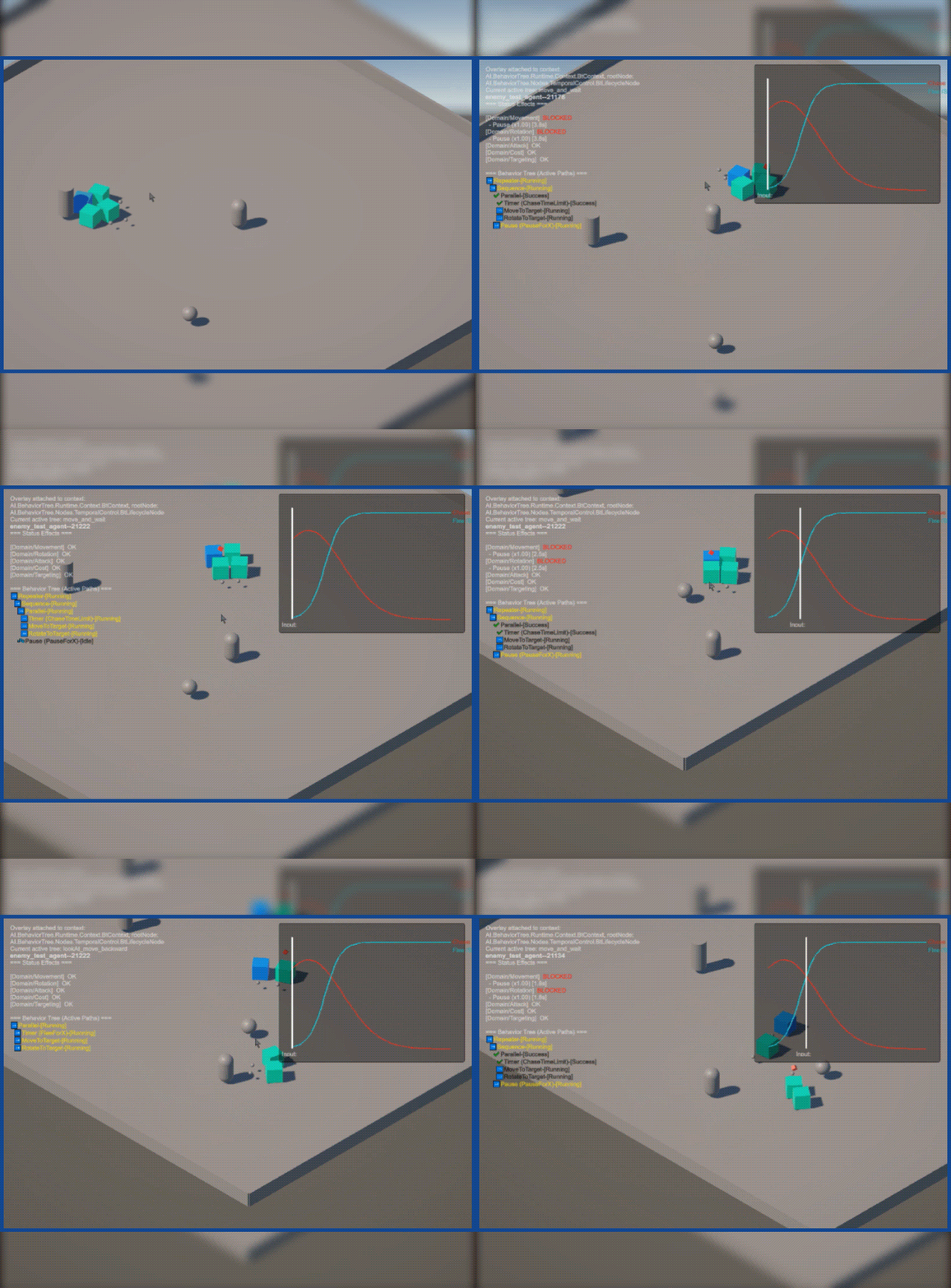
Fear Response: move → pause → move (normal), then lookAtFearSource → flee when stimuli threshold reached
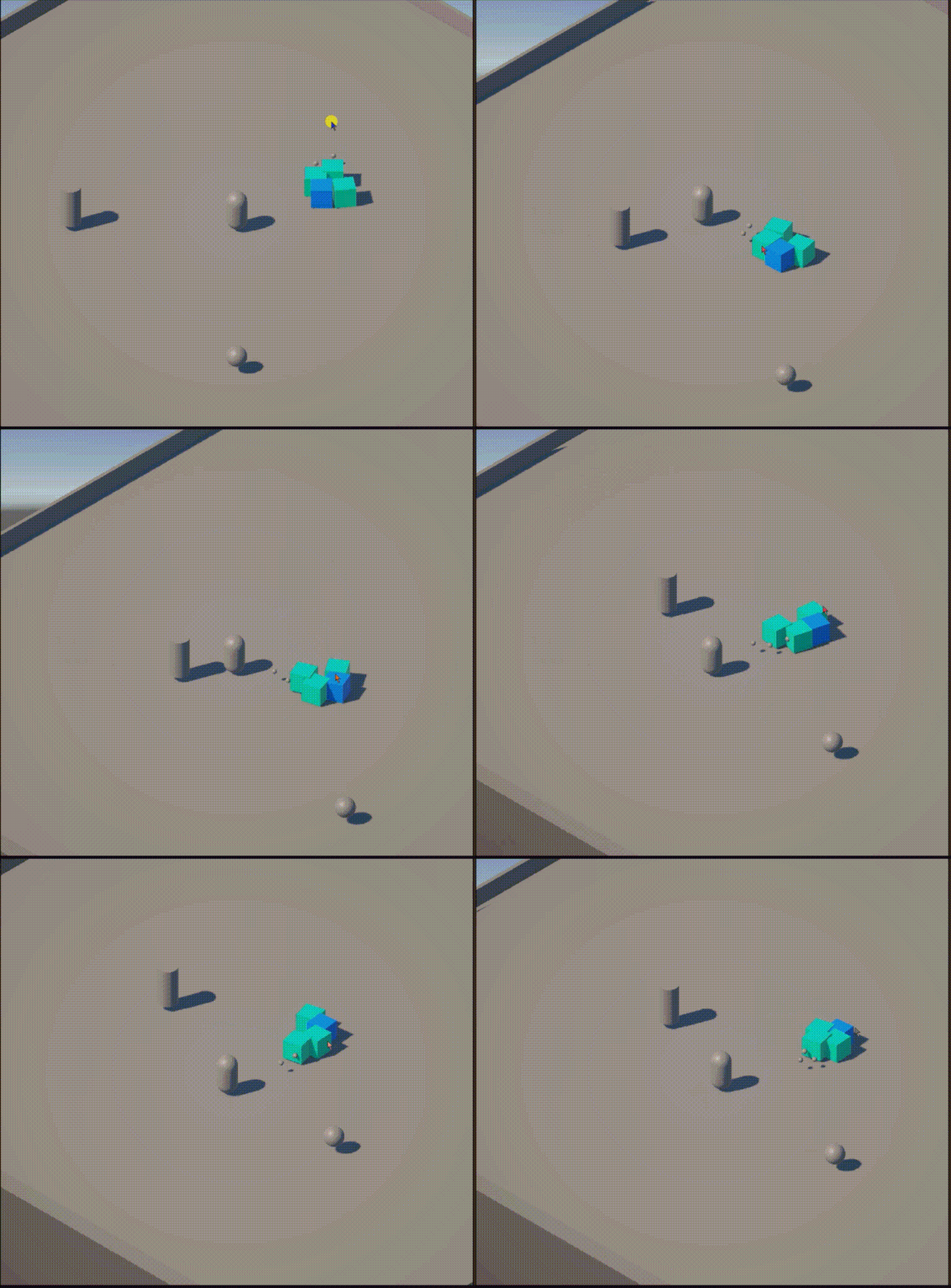
Leadership Protection: Agents dynamically switch roles and formations to shield designated leader from threats
Behavior Sequence Analysis
Fear Response Scenario
The agent begins with routine patrol behavior: moving forward, pausing to "observe," then continuing its path. This represents the baseline state where no significant stimuli are affecting decision-making.
When the fear-inducing stimulus reaches a critical threshold, we see the system's adaptive response unfold. The agent first orients toward the threat source before executing the flee response, demonstrating logical progression rather than random state switching.
Leadership Protection Scenario
Multiple agents coordinate dynamically without pre-scripted formations. Instead, agents evaluate stimuli and threats in real-time, repositioning themselves to maintain protective coverage around the designated leader.
This showcases how individual behavior trees can produce coherent group behaviors without explicit coordination logic.
Architectural Validation
Both scenarios validate the modular architecture's core promise: complex, adaptive behaviors emerge from simple, composable rules responding to environmental input. The smooth transitions between behavioral states prove the system follows logical progressions based on stimuli evaluation.
Runtime Switching
Scenarios focused on hot-swapping subtrees and reloading configurations at runtime. Watching agents change behavior on the fly confirmed the architecture's modularity and revealed where stability still needed work.
Hot-Swap Behavior Demonstration
Real-time configuration reloading showing the framework's modularity in action
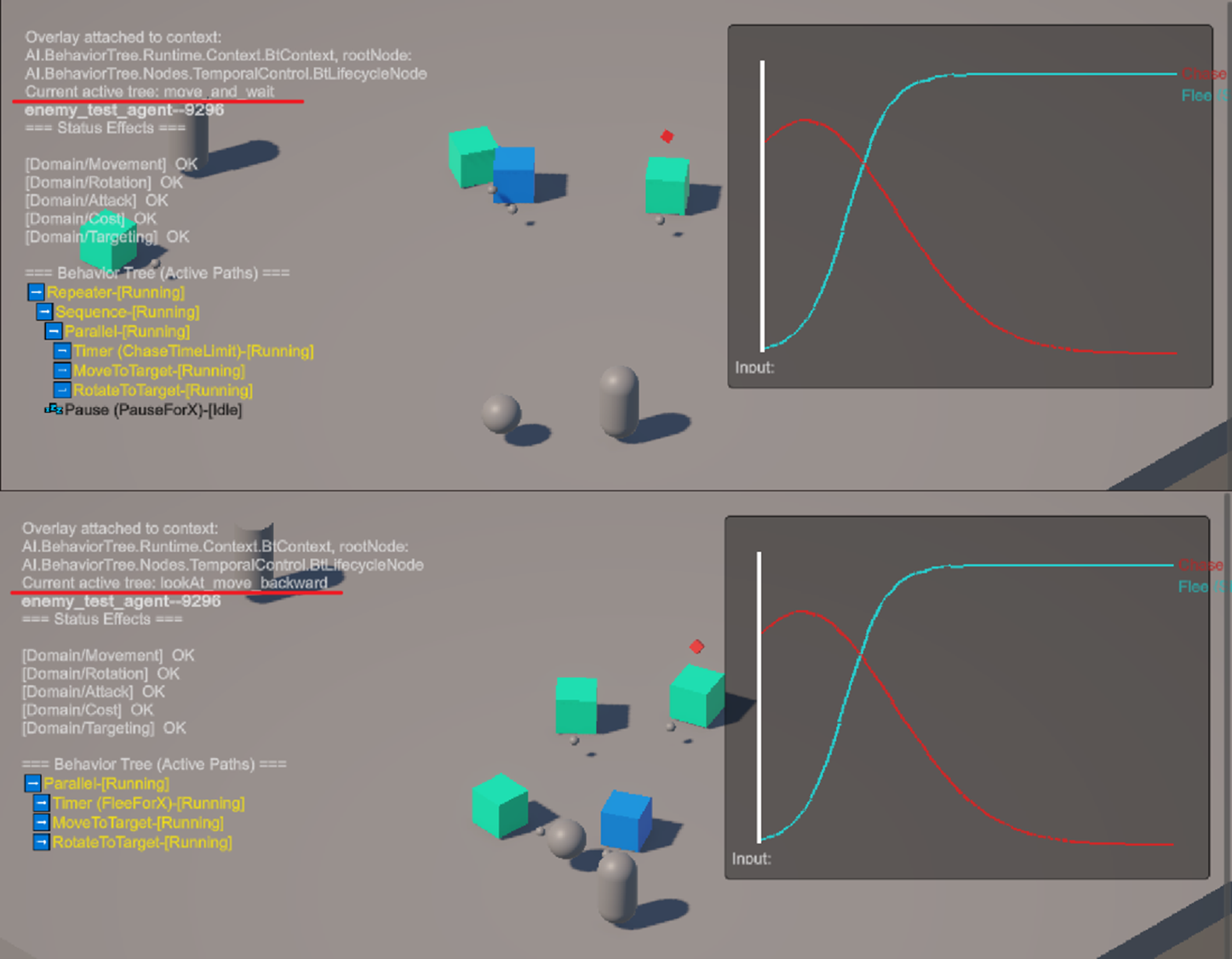
One of the most exciting discoveries came when I realized the framework could adapt its own behavior while still running. By reloading JSON configurations on the fly, I could swap out entire behavior subtrees, adjust stimuli thresholds, or try different selection strategies without stopping execution. Watching these changes unfold in real time made iteration feel more like a live experiment than a stop-start edit–compile–restart cycle.
That said, it is important to be clear about the current limitation. The swapping is still handled in the registry or directly in code, which means there is no dedicated tooling or in-engine interface to hot swap behaviors yet. For now, the process works, but it is not as seamless as a true runtime “spawn and switch” system. Even so, having this partial capability proved invaluable during development, letting me fine-tune behaviors far faster than I could with a traditional workflow.
Debug & Observability
Overlays and logs exposed what was happening inside the blackboard and behavior tree. Seeing states update in real time gave me confidence in the system's transparency, and it turned debugging into a form of live learning.
Debug Overlay & Real-time Monitoring
Unity Inspector displaying live blackboard values, behavior tree states, and stimulus levels
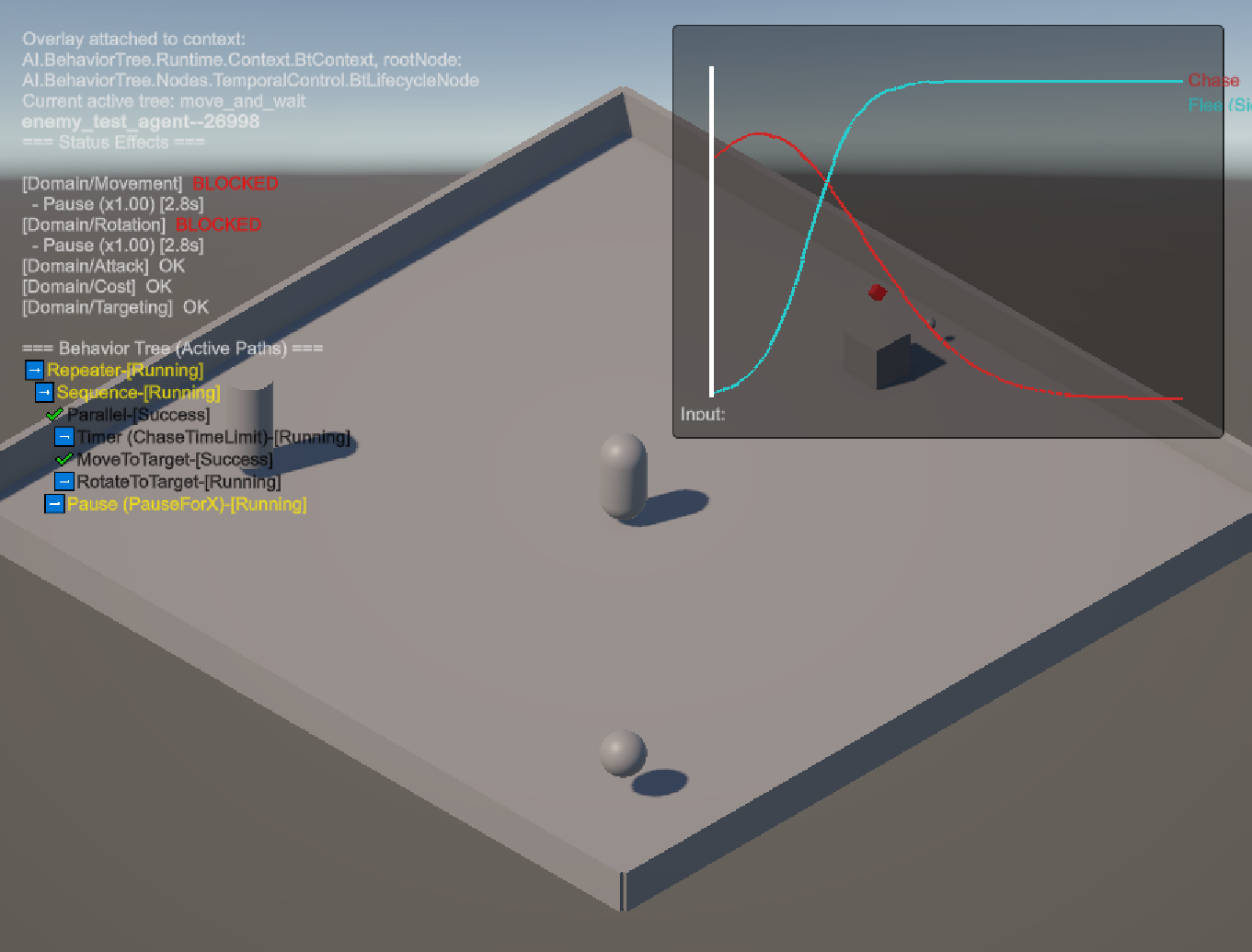
The debug overlay made the invisible visible, displaying real-time blackboard values and behavior tree execution states directly in the Unity Inspector as agents made decisions.
Modulation Curves & Hysteresis Analysis
Mathematical curves showing stimulus response patterns and threshold stability mechanisms

These curves illustrate how stimuli modulation and hysteresis thresholds prevented agents from oscillating between behavioral states, creating smoother and more predictable decision patterns.
Challenges
Testing the framework quickly reminded me that adding complexity does not guarantee smarter AI. Some of the sandbox scenarios made the limits obvious. Unity’s garbage collection introduced noticeable stalls once things scaled up, and my modular abstractions sometimes added overhead that got in the way of clear, responsive gameplay.
Instead of treating these as failures, I started to see them as trade-offs to navigate. Flexibility had to be balanced with efficiency. Clean abstractions had to be weighed against what actually mattered to the player. The more I tested, the more I understood that this framework was not a finished solution but a foundation to build on, something I could keep refining, simplifying, and adapting with each iteration.
Performance Bottlenecks
Unity's garbage collection became the primary limiting factor, not the AI logic itself. Runtime allocations from Dictionary lookups and LINQ operations created frame drops that no amount of architectural elegance could hide. The lesson: performance constraints shape design decisions more than theoretical ideals.
Performance Bottleneck Analysis
Unity Profiler data revealing garbage collection spikes and memory allocation patterns during agent execution
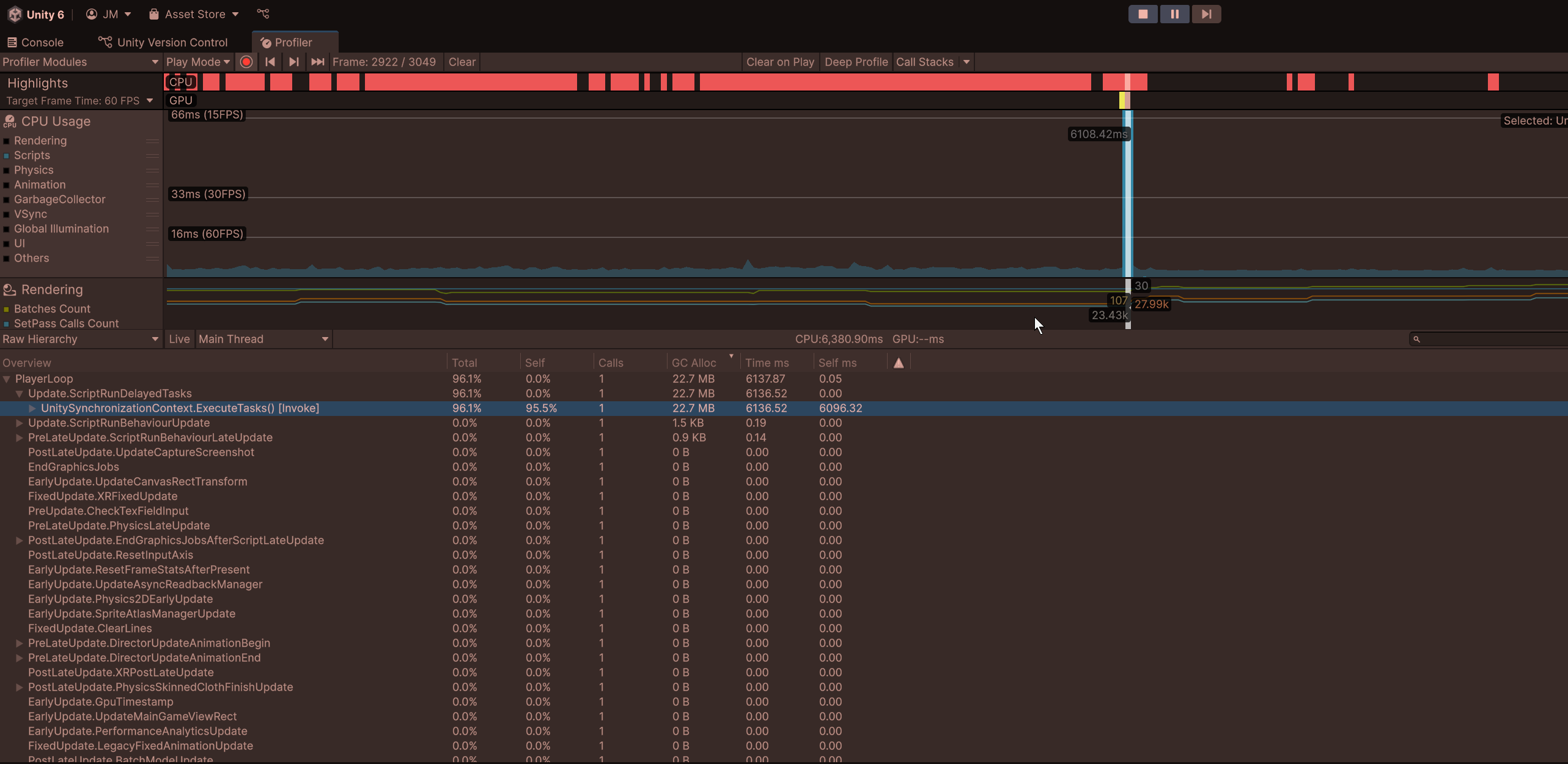
The profiler data clearly shows garbage collection spikes correlating with agent decision cycles, though I should note that comprehensive stress testing wasn't fully possible within the scope of this project.
Testing Limitations & Hardware Context
Caveat: I wasn't able to stress test this framework to its full extent due to time constraints and hardware limitations. My testing environment (i7-3770K, GTX 1660 Ti) is admittedly dated by current standards, which likely contributed to some of the performance bottlenecks observed. A more rigorous evaluation would require testing on modern hardware with larger agent populations and longer-duration scenarios.
That said, the fundamental architectural patterns around memory allocation and garbage collection remain valid concerns regardless of hardware. The profiler consistently showed that Dictionary lookups, LINQ operations, and frequent object instantiation created measurable frame drops even with modest agent counts, suggesting these are genuine design considerations rather than purely hardware-bound issues.
Complexity vs Clarity
As the framework grew, I found that technical sophistication did not always translate into better gameplay. Modulation curves and hysteresis logic solved problems inside the system, but from the player's perspective they often felt invisible. In contrast, simple and predictable behaviors sometimes created a clearer, more responsive experience.
The lesson was that complexity is not automatically valuable. Architectural depth only matters when it produces effects that players can perceive.
Navigating Uncertainty
At the same time, I am aware that I might be solving tomorrow's problems rather than today's. These kinds of explorations carry potential value, but until I push deep enough, it is hard to know if that value is real or just wasted effort.
Working solo made this even more uncertain. I often caught myself wondering if pursuing this project was worth it at all, and whether I should have chosen something more typical for an academic setting. I discussed that tension often with GPT, trying to weigh vision against practicality.
Learning Through Persistence
In the end, I chose to treat it as part of the learning process. Even with second guesses and moments of regret, the only way to find out was to push through and see what lessons emerged.
Still, I recognize that what I miss most is the kind of guidance only a senior developer or mentor can provide. AI tools can surface patterns and suggest options, but they cannot replicate the judgement, experience, and lived perspective that comes from years of building real systems with real players in mind.
Technical Sophistication vs Player Experience
Visual comparison showing how internal system complexity doesn't always translate to meaningful player experience
This diagram highlights the tension I ran into between technical depth and player experience. Adding more sophisticated systems, like modulation curves or runtime switching, often made the framework more interesting to me as a developer but added little that players could actually feel. What players noticed most were simple, predictable behaviors that were clear and responsive. The lesson was that complexity can have value, but only if it translates into an experience players can perceive.
Balancing Ambition & Scope
One of the most valuable lessons was learning when to scale back. I started with a broad vision of building modular AI systems, but quickly ran into the realities of limited time, technical complexity, and the need for working, testable code. Adjusting scope was not a setback, it became part of the learning process. This project taught me how to balance ambition with practicality, and it showed me that refining and simplifying can be just as important as adding new features.
The Development Fork
The critical decision point where ambition met reality and priorities had to be chosen
This fork visualizes the moment when the project faced its defining choice: pursue the comprehensive AI system I originally envisioned, or focus on building solid foundations that could actually be completed and validated. The coursework timeline forced this decision, but it turned out to be the most valuable constraint of the entire project.
Original Ambitious Vision
The initial roadmap revealing just how expansive the original scope really was
This updated roadmap shows the scope of what I initially planned: everything from neural network integration to procedural world generation. Each branch represented months of potential work, and the interconnections between systems would have created exponential complexity.
The Scope Reality
I have to admit this vision was far too ambitious for me to deliver alone. With the help of LLMs, I believe parts of it could still be explored, but only in a much smaller scale with a very tight scope. What began as excitement about endless possibilities has since shifted into respect for the discipline of deliberate simplification.
What kept the project on track was realizing that building a smaller set of features well teaches more than spreading effort too thin. By narrowing scope to behavior trees, stimuli processing, and runtime configuration, I was able to validate architectural choices and see their impact in practice.
Insights Gained
This fork (pivot to use commercial tools) marked the moment I shifted focus. Rather than continuing to extend the AI framework, I began building anotherRun on top of the foundations already in place. The goal became less about stretching architecture in every direction and more about shaping a playable experience.
The pivot let me carry forward the lessons from the framework while turning attention toward polish, player experience, and gameplay systems. It also reminded me of the limits of working solo. I can explore design and test ideas on my own, but the perspective of a senior engineer would add a layer of validation that I cannot fully provide myself. LLMs have been helpful in surfacing alternatives and prompting reflection, but they are not a substitute for experienced review.
For now, I see this work as an exploratory effort, a chance to learn through building, experiment with systems thinking, and refine my approach with each iteration. At the same time, I recognize the limits of my current setup. anotherRun is on hold at the moment due to hardware constraints, and I do not want to risk burning out my passion or losing the opportunity to return to it with fresh energy once those limitations are resolved. This project should be seen as part of an ongoing learning journey rather than a finished destination.
Methodologies That Emerged
CLARITY Framework
The challenges in this project led me to create a personal guide I call the CLARITY framework. It helped me manage complexity through contracts, lifecycle awareness, abstraction, isolation for testing, and testability-first design. It is not an industry standard but a reference I can refine in future work.
Zero GC Policy
Garbage collection spikes pushed me to experiment with zero-allocation practices for critical systems. While not always simple, this shift taught me to think about memory and object lifecycles early, rather than waiting to fix performance issues later.
Iterative Validation Cycles
I learned to design systems that could be extended and tested in isolation, using principles similar to dependency injection. This made experimentation easier and kept the framework adaptable. At the same time, I saw how easy it is, especially with LLMs, to overengineer abstractions that become rigid. The real value was learning to keep designs simple while still open for growth.
Scope-First Planning
Deciding what not to build became as important as planning features. Starting with constraints and building upward helped me avoid wasted effort and stay focused on achievable outcomes. This mindset now shapes how I approach new projects.
Closing Reflection
This project became more than coursework, it shaped how I approach architecture. The SDBT framework may be archived, but the practices it introduced continue to guide how I build.
The experience showed me that valuable projects are often the ones that force you to confront assumptions, work within constraints, and aim for reliable outcomes rather than flashy ones. I also recognize that my perspective is limited. The lessons gained here would grow even stronger with feedback from senior engineers and through collaboration.
What began as curiosity about adaptive AI turned into practice in balancing ambition, constraints, and the discipline to stop before complexity overtakes clarity.
Road Ahead
The framework is not an endpoint but a starting point. Moving forward, I want to refine performance by experimenting with Unity's DOTS/ECS model and more efficient blackboard structures. I also see opportunities to integrate procedural content, expand agent behaviors into richer scenarios, and eventually explore hybrid approaches that combine behavior trees with machine learning.
Technical Evolution Path

Like lighthouses on a dark coast, the next milestones are clear. Migrate toward Unity's DOTS/ECS. Use existing tools. Apply zero-allocation practices. Keep the system lean enough to guide, strong enough to scale.
Setting Sail

The Voyage Ahead
Like setting sail from a safe harbor, the framework marks the beginning of a longer journey. The course is clear: refine performance, expand scenarios, and explore new tools when the time is right. The destination may shift, but the lessons already chart the way forward.
Technical Documentation & Source
Complete implementation details, architectural diagrams, assessment briefs, and analysis are available in the project repository. Feel free to explore the code, review the documentation, and reach out with any questions or feedback.
References:
¹ Aversa, P., Belardinelli, F., Raimondi, F., & Russo, A. (2016). CogBots: Cognitive robotics for multi-agent systems. In Proceedings of the 2016 International Conference on Autonomous Agents & Multiagent Systems.